

This article is designed to step you through the process of modifying your Email Account Settings in Mac Mail.
Instructions
1. Open Mac Mail from the Dock.
2. Depending on your installed Mac OS version you will need to either;
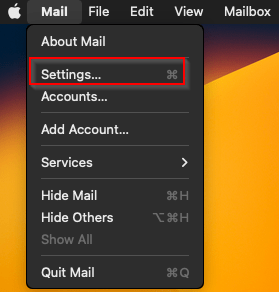
Select Mail and then Settings.
or
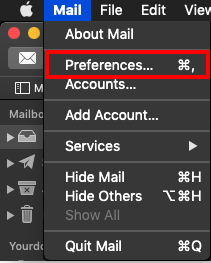
Select Mail and then Preferences.
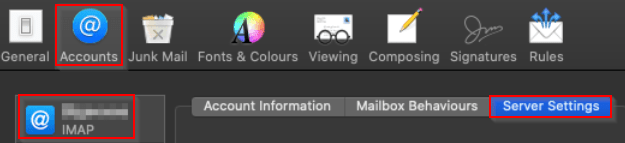
3. Click Accounts in top Menu, then on the left hand side, click on Email account you wish to Modify, then Server Settings.
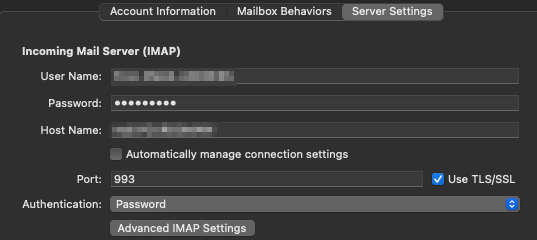
Incoming Mail Server settings
- Username: Should be your full email address.
- Password: Your Email password.
- Host Name: mail.domainname.tld (Replace domainname.tld with YOUR domain name).
- Untick – Automatically manage connection settings
- Port: 993 & tick Use TLS/SSL.
- Authentication: Password
Example screenshot below:
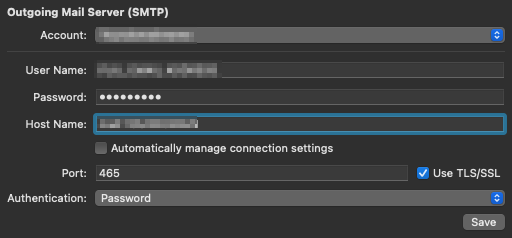
Outgoing Mail Server (SMTP) settings
- Username: Should be your full email address.
- Password: Your Email password.
- Hostname: mail.domainname.tld (Replace domainname.tld with YOUR domain name).
- Untick – Automatically manage connection settings
- Port: 465 & tick Use TLS/SSL.
- Authentication: Password
- Click Save.
Example screenshot below:
You have successfully learnt how to modify your email Account Settings in Mac Mail.


